You’ve narrowed it down to mymind and Raindrop.
How pretty an app looks won’t settle it. What matters is what happens a year from now, when you want the article you saved in March, or the line you highlighted in a PDF, or a recipe you know you kept somewhere. Does the app get you back to it?
That’s the test we use here.
These three apps aren’t three versions of the same thing. Each one starts from a different idea.
mymind files everything for you. There are no folders or tags to manage. You save, it sorts, and you search. It’s built for a calm, visual collection, and it can read the text inside images.
Raindrop is organised by hand. You make nested collections and add tags yourself, and it gives you full control over where things go. In 2026 it added an assistant called Stella and automatic suggestions, which you can switch off.
boilerpod sits between the two. You decide the shape of your library with boards, sections and tags. One link can sit on as many boards as you like, with one set of tags, highlights and reading position. After that, the library files itself. Smart rules file and tag new links, and they run the way you wrote them, marking each item “Filed by rule”. Sticky tags attach themselves. Smart Inbox files a new link only when it’s sure, and it marks each one “Filed for you” so you always know why something is where it is. If you’d rather do it all yourself, switch it off.
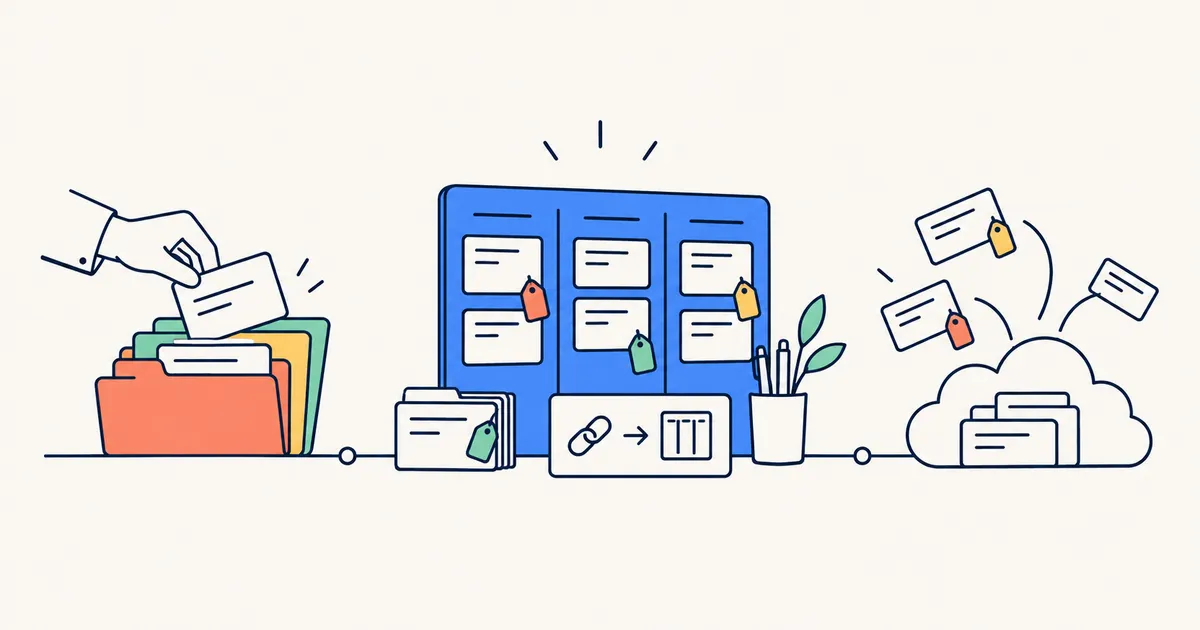 FIG. 01 · Three ideas about filing: by hand, by your own rules, or all for you.
mymind vs Raindrop vs boilerpod, side by side
Competitor details below come from each company’s own site and help pages, checked September 2026.
| mymind | Raindrop | boilerpod | |
|---|---|---|---|
| How things get filed | Filed for you, with no folders or tags to manage | By hand, into nested collections and tags, with optional suggestions | Your boards, sections and tags, with “if this, then that” rules that file and tag new links, sticky tags that attach themselves, plus Smart Inbox when it’s sure |
| Search | Across your cards, including text in images | Full-text search, including YouTube transcripts | One search that reads inside saved pages, PDFs and books, and opens at the matching page or chapter |
| Highlights | Quotes and text highlights from the extension | Highlights and annotations | Five colours, notes and tags, in articles, PDFs, EPUBs and on live web pages. All in one Notebook |
| Keeping pages | Article backup | Permanent copies | Permanent copy, full-page capture, and page history with a word-by-word view of what changed |
Raindrop’s nested collections come in with tags, notes and cover images intact, as boards and sections you can adjust in the preview. Pocket exports, Instapaper, Pinboard and your browser’s bookmarks all work too, and so does any CSV or list of links. Before anything is saved you get a preview of where each folder will land. Import the same file twice and you get no duplicates. It runs in the background and emails you when it’s done.
Export everything at any time: a bookmarks file any browser opens, a full backup with notes, tags and rules, or a single ZIP with every file and kept page. The pages in that ZIP open on their own, offline.
If you’re coming from Raindrop, there’s more detail on the move in our Raindrop comparison.
Will you actually find it again?
Most of us don’t lose things because we saved them in the wrong place. We lose them because we never came back.
boilerpod keeps track of that for you. A Forgotten view shows what you saved over 90 days ago and haven’t opened since. Never opened and Half read are there too, and the dashboard shows what you’re partway through with the minutes left. Articles move from Unread to In progress to Read by themselves, and skimming to the end doesn’t count as reading.
When you do go looking, search doesn’t stop at titles. It reads the full text of your saved pages, PDFs and EPUBs. Look for a phrase you half remember and you’ll get the passage with your words marked, plus the page number or chapter it’s on. Click it and the PDF opens on that page.
mymind has its own way of bringing things back, a feature it calls serendipity that shows you old cards again. If you’d rather be surprised by your collection than sort it, that approach suits you.
Reading and highlights
boilerpod’s reader strips a page down to the text. You choose the typeface (including Literata, Atkinson Hyperlegible and OpenDyslexic), the text size, line spacing and width. It keeps your place on every device, down to the words you were reading, even after the text reflows.
Highlights work the same way in an article, a PDF or an EPUB, and on the live page through the browser extension. Add a note, add a tag, and it lands in your Notebook. If the page gets edited later, your highlight moves with the passage. If the passage is removed, your words and your note are kept anyway. Export the lot as Markdown, CSV or plain text whenever you like.
Pages change and disappear. Keep a permanent copy and the article stays readable, pictures included. Page history keeps versions of a page’s text, so you can compare them word by word and see what was added and what was taken out.
Who each one suits
mymind suits people who collect visually, like designers, moodboard makers and anyone saving images, and who never want to see a folder or a tag. Its image recognition and calm look are the point.
Raindrop suits people who enjoy sorting by hand and like sharing collections with friends or colleagues.
boilerpod suits you if you save to read and want the lines you highlighted to stay yours. You want filing done by rules you can see, and a library that reads your PDFs and books as well as your links. And you want to leave with everything whenever you choose.
Free plan available. See the bookmark manager.