
You open a bookmark you saved in March. It’s a long article. You scroll through it twice and still can’t tell which paragraph made you keep it. The bookmark is in a sensible folder with a sensible name. It just doesn’t tell you anything.
Most people read this as an organising problem, so they add more folders. They spend a Sunday afternoon sorting, rename a few things, and six months later the same bookmarks are just as puzzling.
The folder isn’t the problem
A bookmark records where something is. It doesn’t record why you cared.
On the day you save a page, the reason is obvious. Maybe it was a table halfway down, one line that argued against something you believed, or a recipe you meant to cook for a friend. A week later that reason has gone, and the folder can’t bring it back.
So there are really two jobs here, and they need different fixes:
- Remembering why you saved it. Only you know the reason, and you only know it while you’re saving.
- Putting it somewhere sensible. That part is routine, and it can be done for you.
Most advice mixes the two up. “Add notes later” sounds sensible, but later rarely comes. “Let software sort everything” gets the links into piles, but software can’t know what caught your eye.
Keep the why in the five seconds of saving
This habit works whatever tool you use:
- Write one line when you save. Skip the summary and write the reason: “pricing table near the bottom”, “for the kitchen redo”, “good counterpoint to the article on remote work”.
- Or keep the exact sentence. If one line on the page made you stop, keep that line. Months later, reading it brings the rest back.
- Don’t agonise over where it goes. A quick save with a reason beats a careful save in the perfect folder with no reason at all.
- Let the filing happen afterwards, by rules you set once.
If you’re on plain browser bookmarks, the closest you’ll get is renaming each bookmark to say why you kept it. That helps, but a title only holds a few words, and it replaces the page’s real name.
Let rules organise your bookmarks by themselves
Once the why is written down, where the link lives matters much less. What works is simple: everything new goes into one inbox, and a few rules move things out.
Rules can be very plain. “Anything from youtube.com gets tagged Video and goes to Watch.” “Anything mentioning a recipe goes to Cooking.” You write a few of these once, and new saves that match them file themselves. The ones that don’t are left in the inbox for you to sort in a minute.
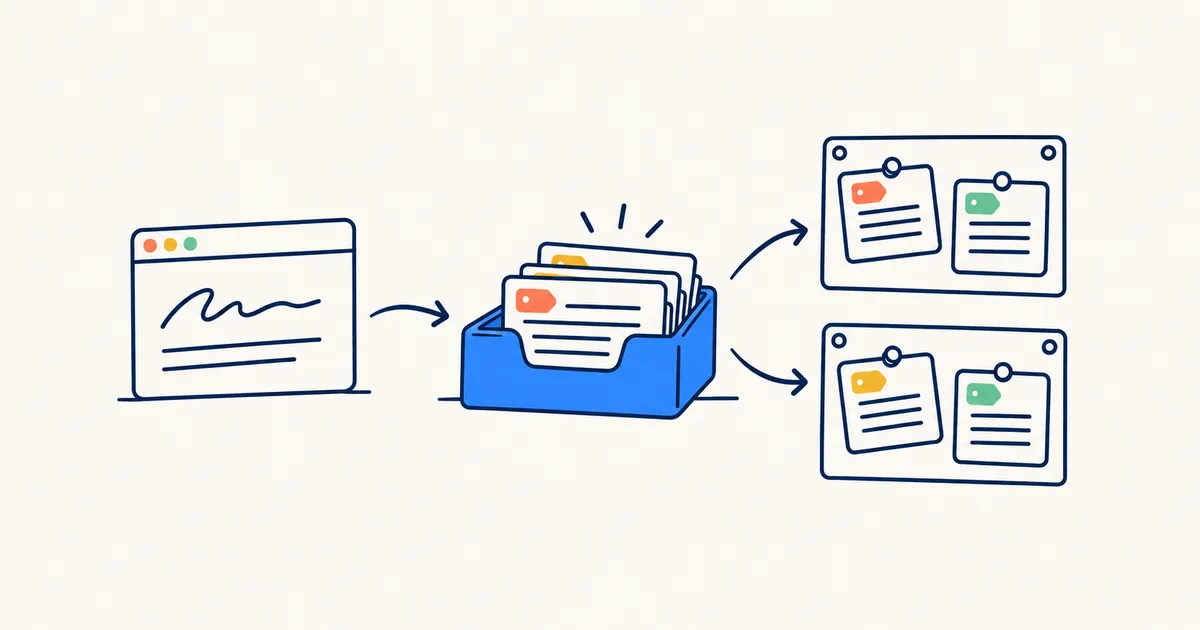 FIG. 01 · You write the reason once. The inbox and rules do the filing.
How boilerpod does both
boilerpod is a personal library for your links, articles, PDFs and notes, with a browser extension that saves the page you’re on. It’s built for exactly this split: you add the reason, and it does the filing.
When you save a page, the note sits in the same small window as the title, board and tags. Type one line and you’re done. The extension works in Chrome, Edge, Brave, Firefox and Safari on Mac, and it opens on the board you used last.
If one sentence made you keep the page, select it before you save. It becomes a highlight on that page. Click the extension when you’re back on the page and your highlight is drawn where you left it. It also goes into the Notebook, which is one place holding every highlight you’ve made, grouped by the page it came from. If the page is edited later, the highlight moves with the passage. If the passage is removed altogether, its words are still kept.
Every new save lands in your Inbox. Smart rules, boilerpod’s “if this, then that” filing, tag new links and move them to the right board or section as they arrive. Each link a rule touched is labelled, so you always know why it’s where it is. Sticky tags do something similar with less setup. Mark a tag like “sourdough” as sticky and it attaches itself to any new save whose title or text contains its name.
If you’d rather not write rules at all, Smart Inbox moves new links onto the board they belong on, but only when it’s sure. It marks each one “Filed for you”, so nothing moves where you can’t see it. You can switch it off whenever you like, and if you move a link yourself, your choice stays.
A board works like a folder, except one link can sit on several boards at once. It’s still a single link with one note and one set of highlights, so you never have two copies saying different things.
Getting the why back later
Writing the reason down only helps if it comes back when you need it. boilerpod has views that show it:
- With notes lists everything you left a line on.
- Highlighted shows every page where you kept a sentence.
- Forgotten brings back things you saved over 90 days ago and never opened since. It’s the best place to decide what’s worth keeping.
- Search reads the full text of every page you saved, so the article from March comes up when you search for what it said, not just its title.
Your existing bookmarks can come too. Import them from Chrome, Firefox, Safari, Edge and other browsers with your folders kept, and importing the same file again won’t make duplicates. Import your browser bookmarks and start adding reasons to the ones you open again.
There’s a free plan. See the bookmark manager.